• Skip to primary navigation
  • Skip to main content
  • Skip to primary sidebar
  • Skip to footer

Galaxy S4 Guides

  • Home
  • About
    • About this community
    • Register
    • Contact
    • Privacy
  • S4 Features
    • Galaxy S4 features explained
    • Air Gesture
    • Air View
    • Adapt Display
    • Adapt Sound
    • Animated Photo
    • Business card reader (Optical Reader)
    • ChatON
    • Dual Shot
    • Drama Shot
    • Easy Mode
    • Eraser Shot
    • Group play
    • HomeSync
    • S Health
    • S Translator
    • Samsung Hub
    • Smart pause
    • Smart scroll
    • Sound and Shot
    • Story Album
    • WatchON
  • Manual
    • Updated to Lollipop: Samsung Galaxy S4 Lollipop User Manual (PDF)
    • Galaxy S4 online user manual (HTML)
    • Galaxy S4 user manual (PDF)
      • AT&T Samsung Galaxy S4 Manual
      • Galaxy S4 Manual for Verizon
      • Galaxy S4 Manual for T-Mobile
      • English
      • Arabic (العربية al-ʻarabīyah)
      • Bulgarian (български език, bălgarski ezik)
      • Croatian (hrvatski)
      • Czech (čeština)
      • Danish (Dansk)
      • Dutch (Nederlands)
      • Finnish (Suomen kieli)
      • French (français)
      • Indonesian (Bahasa Indonesia)
      • Italian (Italiano)
      • Japanese (日本語)
      • Korean (한국어)
      • Norwegian (Norsk)
      • Persian (Farsi)
      • Polish (język polski, polszczyzna)
      • Portuguese (português, Brazil)
      • Romanian (limba română)
      • Russian (ру́сский язы́к)
      • Spanish (español)
      • Swedish (Svensk)
      • Thai (Siamese, ภาษาไทย)
      • Traditional Chinese (繁体中文)
    • Galaxy S4 Customer Consultant Guide
  • S4 Tips
    • How to install Flash on Galaxy S4 (and make it work!)?
    • How to take screenshot on Galaxy S4 without using any apps?
    • Top 5 problems after Android 4.3 update for Galaxy S4, and the solutions
    • Air Gesture
    • Easy Mode
    • S Health
    • Story Album
    • Smart scroll
    • Sound and Shot
    • The ultimate guide of Galaxy S4 screen mirroring
  • Buyer Guide
    • S4 Case/Cover
  • Forums

Galaxy S4 Buyer Guide

The ultimate guide of Galaxy S4 screen mirroring

by simon 96 Comments

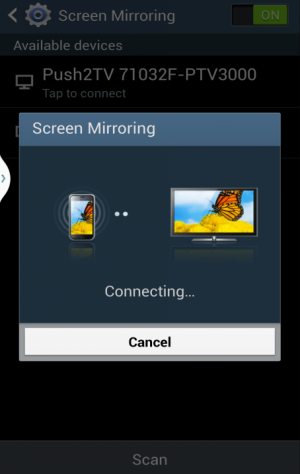
galaxy s4 screen mirroringUpdate 1: Please do not confuse Galaxy S4 screen mirroring  with Android screen mirroring through Chromecast. Android screen mirroring (screen cast) is also supported on Galaxy S4. 

Update 2: For detailed comparison of Chromecast and Miracast, please check this guide.

You may not know you can enjoy any contents in your Galaxy S4 in a bigger screen (e.g., TV).  You can simply share the Galaxy S4 screen with most TVs or even some projectors.

This is Galaxy S4 screen mirroring.

Some geeks may call it wireless display, which is used by some other vendors.

Galaxy S4 Screen Mirroring is one of the prominent features in the smartphone. But unfortunately, this feature is under-used, because there are no clear guides for Galaxy S4 owners on how to use screen mirroring in Galaxy S4

This ultimate guide of Galaxy S4 screen mirroring will solve the problem for you.

Everything you need to know about Galaxy S4 screen mirroring will be covered.  I will update this guide regularly. If you have any questions or suggestions, please leave them in the comments section below.

What is Galaxy S4 screen mirroring?

Galaxy S4 screen mirroring (or wireless display) simply duplicates the display in your Galaxy S4 on TV or other bigger  screens (e.g., projectors). In other words, instead of staring at the 5″ screen, you can share Samsung Galaxy S4’s screen with TV of any size. The Samsung Galaxy S4 then works like a remote control for your TV.

This means you can consume any contents from your Galaxy S4 on a TV with a bigger screen with screen mirroring. For example, you can watch any videos  on the TV screen  from Galaxy S4. This usually gives better watching experience. You can easily share the video or the show with your family members … Read the rest
Filed Under: Galaxy S4 Buyer Guide, Galaxy S4 review Tagged With: brightness, Galaxy S4, HDMI, HomeSync, Miracast, screen mirroring, share screen, TV, wireless display

Top 5 problems after Android 4.3 update for Galaxy S4, and the solutions

by simon 114 Comments

s4-jb-4-3-update-problemsIt is estimated that  about more than half of Galaxy S4 users now enjoy Android 4.3. As summarized in last post of  Top 10 new or improved features in Jelly Bean 4.3 update for your Samsung Galaxy S4, most of users feel happy with the upgrade.
Of course, some Galaxy S4 owners encounter some problems after the 4.3 upgrade. Some of these problems can be very disturbing, and therefore these  owners may get frustrated. In this post, I will share with you the  5 most common problems you may encounter after the Jelly Bean 4.3 update and the solutions. S Health problems, missing mobile data toggle, apps on lock screen, annoying security warning,  and lack of Outlook sync will be covered. If you have any other problems, you may post them in comment box below.

S Health Problems after Jelly Bean 4.3 update

The most widely reported problems is related to S Health. It seems this Android 4.3 update for S4 messed up the S Health app.

The problems include:  1). missing S Health after Jelly Bean 4.3 update; 2). S Health cannot start; 3). missing blood pressure and blood glucose related functions.  I already shared the solutions for these three problems in our Newsletter (you may subscribe to it in the subscription box below, or in the sidebar).

If you cannot find S Health in your S4 after the 4.3 upgrade, You can try to open Samsung Apps. Please note, you  need a Samsung account for Samsung Apps. Once in Samsung Apps, tap Menu button and select “purchased”. You should be able to find S Health app there. You can install it from there.

The second issue with S health App after the update is that S Health cannot start. It can be simply no response, or … Read the rest

Filed Under: Galaxy S4 Buyer Guide, Galaxy S4 News, Galaxy S4 review Tagged With: facebook, factory reset, Galaxy S4, jelly bean 4.3, Kies, Kies 3, KNOX, lock screen, mobile data, notification, outlook, S Health, samsung, setting, update, upgrade

Google Play Store Edition Galaxy S4: is it better or worse than the original S4?

by simon 4 Comments

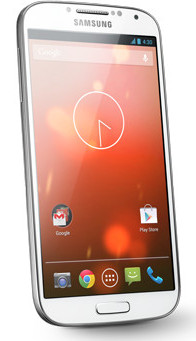
gogole-play-edition-galaxy-s4As announced in Google I/O 2013, Google edition of Galaxy S4 now is available  for order on Google Play Store (US only currently). You can get one at $649 with free shipping.

Google edition Galaxy S4 comes with stock Android 4.2.2. It means it is a vanilla version of Android like that in Nexus devices. The controversial TouchWiz skin  was stripped, and the stock UI was loaded. So, users will get the “pure” Android experience without bloatwares and hacks from manufactures. The 16GB Google Play version of Galaxy S4 has a usable storage of 12.65GB; while the original one you get from the carriers has only about 9GB.

Sizable Nexus users have been enjoyed such benefits for long time.  Nexus devices receive the update from Google directly. This means once the new version of Android is announced, the Nexus users will get it just in a couple of days.  However, for Samsung Galaxy S, S2 and S3 users, they have to wait at least 6 months to get such updates. In some regions, the update may be not available at all.

Another benefit enjoyed by  Nexus users is that there are no bloatwares from manufacturers and carriers. such bloatware not only eats the precious internal storage, but also may degrade the performance of the handset. Most of the bundled apps are not needed for most users.

Of course, some customizations from the manufactures  do add extra functions and features. For example, most of the prominent (useful or useless) features in Galaxy s4 as explained in the S4 features page are only available from Samsung.

Google edition of Galaxy S4 has no differences with  the original S4 when we talk about the hardware. Both comes  5″  full HD AMOLED display,  Qualcomm Snapdragon 600,  2GB RAM, 13MP/2MP … Read the rest

Filed Under: Galaxy S4 Buyer Guide, Galaxy S4 News, Galaxy S4 review Tagged With: Adapt display, AMOLED, Android, animated photo, camera, Dual shot, full HD, Galaxy S4, Google, jelly bean 4.2, Nexus 4, samsung, TouchWiz, UI, update

Galaxy S4 or Optimus G Pro? Here is the comparison

by simon Leave a Comment

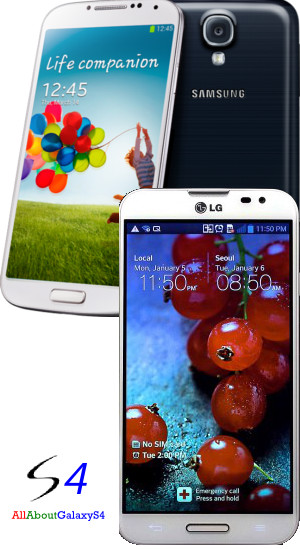
s4-vs-optimus-g-proLG is not a new player in smartphone, but it never delivered a memorable products until Nexus 4, a collaboration with Google. Nexus 4 has been one of the most desired Android phones. But due to limited coverage on devices in Play Store, many potential buyers do not have the chance to order one.

Instead of bringing Nexus 4 to more markets, LG chose to release an own branded LG Optimius worldwide. It is a smart move to build own brand and this is probably also the purpose of Google to avoid the monopolization of Samsung in Android market.  Optimus G shares many similar design elements found in Nexus 4. The build quality is  incredible.

However, Optimus G is a bit outdated now, and its direct competitor is Galaxy S3. So, this year,  during the Mobile World Congress 2013, LG announced the Optimus G Pro. It seems LG is a bit confused on the positioning of this device. The 5.5-inch screen puts it in the phablet segment; however, lack of stylus obviously disadvantage itself against Galaxy Note 2. You may refer to  the comparison of Optimus G Pro and Galaxy Note 2.

Very likely, LG also expected this Optimus G Pro to be a rival to Galaxy S4. Will this one-stone-kill-two-birds product strategy work? At least, based on our review, it lost the battle against Galaxy Note 2. Now let’s compare it with Galaxy S4.

Design and build quality

Optimus G’s design and build quality is extrodinary, probably only HTC One can compete against it. But unfortunately, as design and build quality is concerned, Optimus G Pro has nothing to do with Optimus G. Optimus G Pro looks like a copycat of Galaxy Note 2!! Plastic was chosen to replace the glass. This is a serious joke if … Read the rest

Filed Under: Galaxy S4 Buyer Guide, Galaxy S4 review Tagged With: AMOLED, Android, camera, design, dual camera, Galaxy Note 2, Galaxy S3, Galaxy S4, Google, IPS, jelly bean, jelly bean 4.1, jelly bean 4.2, LG, LG Optimus G, LG Optimus G Pro, Nexus 4, Optimus UI, pixel density, samsung, software, TouchWiz

Sony Xperia Z vs Samsung Galaxy S4, which one is for you?

by simon Leave a Comment

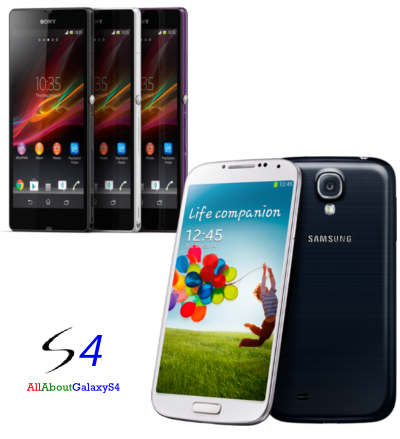
xperia-z-vs-galaxy-s4Sony Xperia Z was announced in January this year. In most regions, it is already available. So, it is possible to put your hands on it in local handphone shops.

Sony Xperia Z is the flagship smartphone from Sony in 2013, and it surely is Samsung Galaxy S4‘s close competitor. Many buyers are facing a difficult choice: S4 or Xperia Z? In this buyer’s guide, I will compare Samsung Galaxy S4 and Sony Xperia Z. Similar to the comparison between Galaxy S4 and HTC One, The comparison will be focused on 1).design and build quality; 2).battery; 3). software; 4). camera and video; and 5). display.

You may noticed, I seldom compare specifications, because most of flagship Android phones are overpowered. In other words, the hardware has more than sufficient power already, and therefore, it does not make sense to compare the specifications among such top-level phones.

 Round One: Design and build quality

No words needed. When you put your hands on them, you will immediately know Xperia Z wins. The design and build quality of Xperia Z is second to none. It looks beautiful and sleek. When you put it in your hands, it is well balanced and all buttons feel perfect. Apparently, all details are well considered in the design.

The material used for the back is high gloss glass, similar to that in  Nexus 4. It does give you premium feeling. But if you are going to use a case or cover, this may be not of your interest.

Another nice design feature of Xperia Z is water and dust resistant. Spilling of coffee is not an issue for Xperia Z. You can even use the phone when shower. You can even wash it  with water or soak it in water! Of course, you … Read the rest

Filed Under: Galaxy S4 Buyer Guide, Galaxy S4 News, Galaxy S4 review Tagged With: AMOLED, Android, battery, camera, display, dual camera, dual recording, Dual shot, dust, Galaxy S4, HDR, HTC One, IPS, jelly bean, Key Lime Pie, samsung, software, Sony Xperia Z, TFT, TouchWiz, UI, video, waterproof

Should I buy HTC One or Samsung Galaxy S4?

by simon 15 Comments

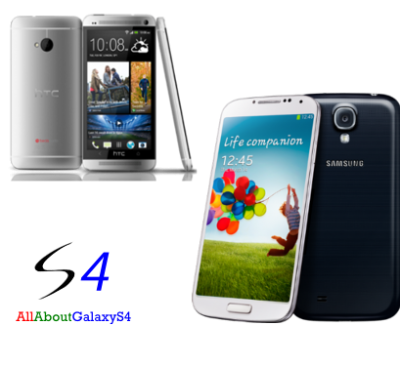
galaxy-s4-vs-htc-one-photoWith the official announcement  of Galaxy S4, some buyers are considering between Galaxy S4 and HTC One.

Yes, this can be a difficult decision. The price difference of these two handsets should not be large in most regions. The hardware specifications are both top-notch based on today’s standard. So, it boils down to personal taste and features.

Now let me help you make the decision based on 5 aspects:  1) design and build quality; 2) battery; 3). software; 4). camera and video; 5). audio and speakers.

Round one: design and build quality

When talking about design and build quality, HTC One is surely the winner. HTC One’s aluminum body and sleek design makes it very attractive, and gives a premium feeling when holding it in hands. However, Samsung’s plastic (although it is named as polycarbonate)  design with rounded corners makes it simple and clean. Of course, it may not give you the premium feeling, but it is more durable.

The fact is that more than half of smartphone users will put the their phones into cases! So, if you are going to put your Galaxy S4 or HTC One into a case, the design and build quality does not matter.

Round two: Battery

Samsung Galaxy S4 packs a 2600mAh battery, while  HTC One comes with a 2300mAh battery. For a full HD screen, the battery is probably sufficient for one-day usage for  most users unless you are a heavy user. The battery life should be similar on these two phones.

However, the battery in Galaxy S4  is removable; while the one in HTC One is non-removable. As today’s Li-ion or Li- polymer battery can only sustain about 400-800 full cycles (charge–discharge), your battery will lose capacity significantly after one year or something. For phones … Read the rest

Filed Under: Galaxy S4 Buyer Guide, Galaxy S4 review Tagged With: Android, battery, camera, dual recording, Dual shot, Galaxy S4, HTC One, jelly bean, samsung, Sense, speaker, TouchWiz

Primary Sidebar

Follow Us!

Follow Us on TwitterFollow Us on YouTubeFollow Us on RSSFollow Us on Facebook

RSS Android Guides

  • A Complete Guide to Android ADB Wireless Debugging
  • Android 16: the definitive guide on new features and changes
  • Master Android 15 Easter Egg Game: Landroid
  • New Features and Improvements of Android 15
  • Top 14 new features of Android 14
  • Top 10 New Features of Android 13

RSS Galaxy S25 Guides

  • All New Features of One UI 8 (Android 16) Update for Galaxy S25, S24, S23, and S22
  • One UI 8 Update Highlights for Galaxy S25, S24, S23, and S22
  • How to manage camera modes on Galaxy S25 (and Galaxy S24, S23, S22, and S21 with One UI 7 update)?
  • How to Use Galaxy S25 Camera App?
  • A Definite Guide to Galaxy S25 Flipsuit Case
  • How to Access and Customize Now Brief on Galaxy S25?
  • Meaning of Galaxy S25 Status Icons and Notification Icons
  • Layout of Galaxy S25, S25+, and S25 Ultra

RSS Galaxy S24 Guides

  • The definitive guide to One UI 7 (Android 15) update for Galaxy S24, S23, S22, and S21
  • The Definitive Guide to Galaxy AI on Galaxy S24, S23, S22, Fold 6, Fold 5, Flip 6, and Flip 5
  • Use the Light Performance Profile to Extend Battery Life and Reduce Heat on Galaxy S24, S23, S22, and S21 (all Samsung Galaxy Phones with Android 14/One UI 6.0)
  • How to adjust lock screen timeout on Galaxy S24, S23, S22, and other Galaxy devices?
  • How to use Circle to Search on Galaxy S24?

RSS Galaxy S23 Guides

  • Explanation of all One UI 6.1 features for Galaxy S23, S23+, S23 Ultra, and other Galaxy devices
  • How to use One-Tap Editing in the Android 14 (One UI 6) update?
  • How to enable and use Auto Scan to scan documents automatically on Galaxy S23, S22, and S21?
  • New camera features in One UI 6 (Android 14) update for Galaxy S23, S22, and S21
  • Galaxy S23 User Manual in American English with Android 14 (One UI 6) Update

RSS Galaxy S22 Guides

  • A Complete Guide for Android 14 (One UI 6) Update on Samsung Galaxy Devices
  • How to touch and hold to customize Lock Screen on Galaxy S22, S21, and S20 with the Android 13 update?
  • How to use Maintenance Mode on Galaxy S23, S22, S21, and S20 with Android 13 (One UI 5)?
  • How to extract text from photos and images on Galaxy S22, S21, and S20?

RSS Galaxy S21 Guides

  • Top 12 new features in Android 12 update for Galaxy S21, S20 and S10
  • Android 12 update vs One UI 4.0 vs One UI 4.1: update Galaxy S21, S20 and S10 to Android 12
  • How to set and resize photo size on Samsung Galaxy S21, S20, S10, and S9 without using any third-party apps?

RSS Galaxy S20 Guides

  • The End of the Road: No Android 14 Update for the Galaxy S20
  • How to Use Enhanced Processing on Galaxy S20 with Android 11 update?
  • How to access, use, and customise widgets on Galaxy S20 lock screen and AOD screen with Android 11 update for Galaxy S20?

RSS Galxy S10 Guides

  • End of security update for Galaxy S10, S10+ and S10e
  • Top 10 new features in Android 10 update for Galaxy S10
  • Top 5 new features added in Galaxy S10 September Update
  • How to move apps to the micro SD card to free phone storage on Galaxy S10 ?

RSS Galaxy S9 Guides

  • How to use Bixby quick commands on Galaxy S9, S9+, S8, S8+, Note 8, and Note 9 with the Android Pie update?
  • How to remap Bixby button on Galaxy S9 and S9+ after updating to Android Pie?

RSS Galaxy S8 Guides

  • How to use the new features in Android Pie update for Galaxy S8 and S8+?
  • How to use app shortcuts in Galaxy S8 Home screen in Android Oreo update for Galaxy S8 and S8+?

RSS Galaxy S7 guides

  • How to use Galaxy S7 multi window new features in Android Nougat udpate for Galaxy S7 and Galaxy S7 edge?
  • How to customize Galaxy S7 quick setting buttons after Android Nougat update?

RSS Google Home Guides

  • How to Use Quick Gestures on Nest Hub 2nd Gen and Nest Hub Max?
  • Understand the layout of Nest Hub (including Nest Hub 2nd Gen, Google Home Hub)

RSS Moto X Owners Community

  • Welcome on board, Motorola Razr!
  • Official Moto X4 User manual (User guide for Moto X 4th Gen , Moto X 2017)

RSS Galaxy Note Tips & Tricks

  • Top 11 disappointments of Galaxy Note 20 and Galaxy Note 20 Ultra
  • How to use the Dynamic Lock screen on Galaxy Note 10?

RSS Moto G Phone

  • Stylus features on Moto G Stylus (all models)
  • What’s new in Moto G 2024? Moto G 5G 2024 vs Moto G Power 2024 vs Moto G Play 2024
  • Understand Moto G Model Names
  • Thank You

RSS Chromecast Guide

  • How to enable developer options in Chromecast with Google TV and Google TV Streamer?
  • Meaning of LED light on voice remote for Chromecast with Google TV and Google TV Streamer
  • What’s new in Chromecast 2018 (3rd gen of Chromecast)?
  • How to use VLC media player on PC to stream music and video to Chromecast and Chromecast Audio?

RSS Galaxy S6 Guides

  • Android Nougat Update Guide for Galaxy S6, Galaxy S6 edge and Galaxy S6 edge+
  • Official Galaxy S6 user manual with Android Nougat update

RSS Drive in Singapore

  • Singapore ERP (Electronic Road Pricing): 6 Facts You Need to Know
  • Car Insurance in Singapore Explained
  • Top 5 rules of driving in Singapore safely and legally during COVID-19 Circuit Breaker period
  • Understand COE Price by 10 Simple Questions
  • Home
  • About
    • About this community
    • Register
    • Contact
    • Privacy
  • S4 Features
    • Galaxy S4 features explained
    • Air Gesture
    • Air View
    • Adapt Display
    • Adapt Sound
    • Animated Photo
    • Business card reader (Optical Reader)
    • ChatON
    • Dual Shot
    • Drama Shot
    • Easy Mode
    • Eraser Shot
    • Group play
    • HomeSync
    • S Health
    • S Translator
    • Samsung Hub
    • Smart pause
    • Smart scroll
    • Sound and Shot
    • Story Album
    • WatchON
  • Manual
    • Updated to Lollipop: Samsung Galaxy S4 Lollipop User Manual (PDF)
    • Galaxy S4 online user manual (HTML)
    • Galaxy S4 user manual (PDF)
      • AT&T Samsung Galaxy S4 Manual
      • Galaxy S4 Manual for Verizon
      • Galaxy S4 Manual for T-Mobile
      • English
      • Arabic (العربية al-ʻarabīyah)
      • Bulgarian (български език, bălgarski ezik)
      • Croatian (hrvatski)
      • Czech (čeština)
      • Danish (Dansk)
      • Dutch (Nederlands)
      • Finnish (Suomen kieli)
      • French (français)
      • Indonesian (Bahasa Indonesia)
      • Italian (Italiano)
      • Japanese (日本語)
      • Korean (한국어)
      • Norwegian (Norsk)
      • Persian (Farsi)
      • Polish (język polski, polszczyzna)
      • Portuguese (português, Brazil)
      • Romanian (limba română)
      • Russian (ру́сский язы́к)
      • Spanish (español)
      • Swedish (Svensk)
      • Thai (Siamese, ภาษาไทย)
      • Traditional Chinese (繁体中文)
    • Galaxy S4 Customer Consultant Guide
  • S4 Tips
    • How to install Flash on Galaxy S4 (and make it work!)?
    • How to take screenshot on Galaxy S4 without using any apps?
    • Top 5 problems after Android 4.3 update for Galaxy S4, and the solutions
    • Air Gesture
    • Easy Mode
    • S Health
    • Story Album
    • Smart scroll
    • Sound and Shot
    • The ultimate guide of Galaxy S4 screen mirroring
  • Buyer Guide
    • S4 Case/Cover
  • Forums

Footer

RSS Headhone Guides

  • Bluetooth LE Audio and the LC3 Codec: A Technical Deep Dive
  • The Physics and Engineering of Super Wide Band (SWB) Voice
  • True Wireless Stereo (TWS) Explained
  • The Complete Technical Guide to the Galaxy Buds 4 & Buds 4 Pro
  • The Right Fit of Galaxy Buds 4 — User Personas & Recommendations

RSS Chinese Music

  • How to Cast Chinese Music Radio to Chromecast or Google Home?
  • 十面埋伏 (Ambushed,Pipa,琵琶曲,Shi Mian Mai Fu)
  • Meet in Yurt(敖包相会, Ao Bao Xiang Hui,Folk song,民歌)
  • Purple Bamboo Melody(紫竹调, Zi Zhu Diao,Yangqin,扬琴)

RSS Kindle Fire Guide

  • Fire Tablet Buyer’s Guide 2025
  • How to use Writing Assist on Fire Tablet?
  • How to use Wallpaper Creator on your Fire tablet?
  • How to Use Webpage Summaries on Your Fire Tablet?
  • What’s new in Fire HD 8 2024 (12th Gen)?

© 2013–2026 · All About Galaxy S4 is an online community for Galaxy S4 owners! · · Hosted by PTRHosting · Powered by Genesis framework for WordPress
Samsung Galaxy S4 guide, user manual and tutorials! Everything about how to use Samsung Galaxy S4.
Disclaimer: Samsung, Galaxy, Galaxy S4 are trademarks of Samsung. Android is a trademark of Google. This website is NOT affiliated with Samsung or Google in any way. All the information provided on this website is provided on an "as is" and "as available" basis and you agree that you use such information entirely at your own risk.

We use cookies to give you the best online experience. By using our website you agree to our use of cookies in accordance with our cookie policy.
pixel